Distance Learning (eLearning)
Online classes are not necessarily easier or harder than regular classes. They may offer increased flexibility to students who are working or raising a family, but can still be time-consuming. Before signing up for an online class, you should think about the following:
- How organized and self-motivated are you? Being able to work independently is especially important for success in online classes.
- How much do you value the social, interpersonal aspects of education? There is less direct contact between the instructor and students in online classes. Classes may be conducted using a video conferencing app such as Zoom, or non-verbally using discussion boards or other writing-based methods that don’t involve meeting at a specific time. Some students thrive in this setting, while others struggle without the physical presence and moral support of their peers.
- What is your comfort level with technology? Most online classes don’t require advanced technical skills, but you should be comfortable with basic computer use before you attempt one.
Some courses have “hybrid” status, meaning that they have both in-person and significant online components.
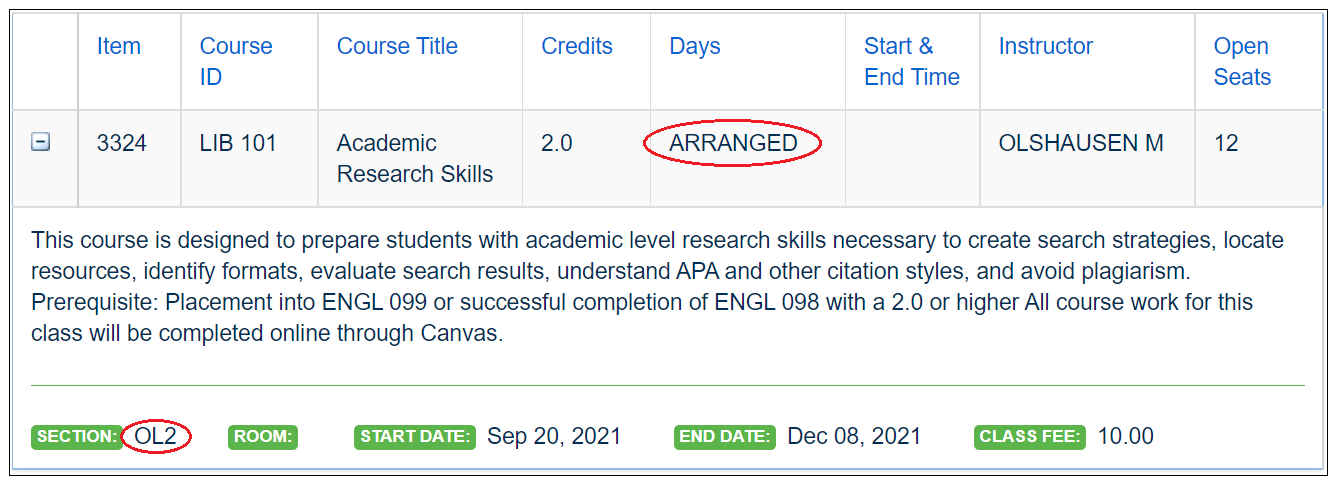
In the class schedule, the OL section designation (which appears if you expand the course description) indicates an online class. H indicates a hybrid class. If you see ARRANGED under Days, this is also an indication that the course is online and meets at no fixed time.
You will access Canvas, BBCC's learning management system, by clicking on "My Apps" on any BBCC web page and logging in. While you can access Canvas through the ctcLink we do not recommend using that option.
Instructors use Canvas to post course syllabi and other information. Many use it to have students submit assignments and for quizzes and tests.
If your class has an online textbook (Day 1 Access/D1A) or course content you will also find that in Canvas.
If you are taking a fully online class this is where you will find all of your class content.
Learn the ins and outs of Canvas HERE!

Miller, Amanda
e-Learning Support